Sorting a Pivot Table
Pivot tables can be sorted and filtered in the same way as tables. This, too, has its own complications in terms of the different columns and the addition of information. So let's go through the basics of sorting.
The Objective
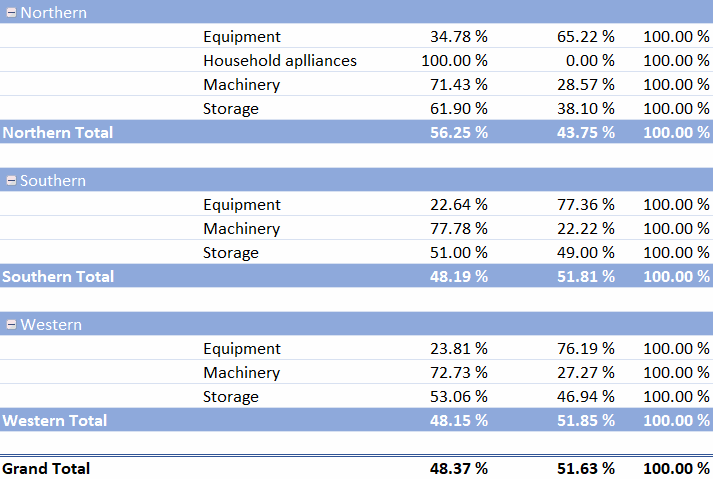
The Product group column in the Sales by region table is sorted alphabetically:
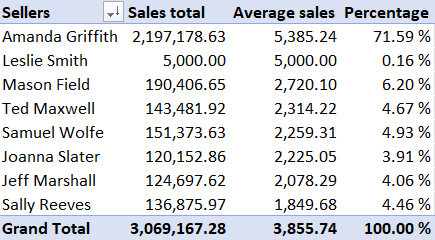
The Comparison by seller table is sorted by average sales:
Task: Update the order of the Product group column
When a pivot table is created, the data is sorted alphabetically regardless of its order in the table, but if new data is added to the end of the table, it will also rank last in the table.
We added a new row at the end of the table, where we wrote Household appliances as the product group.
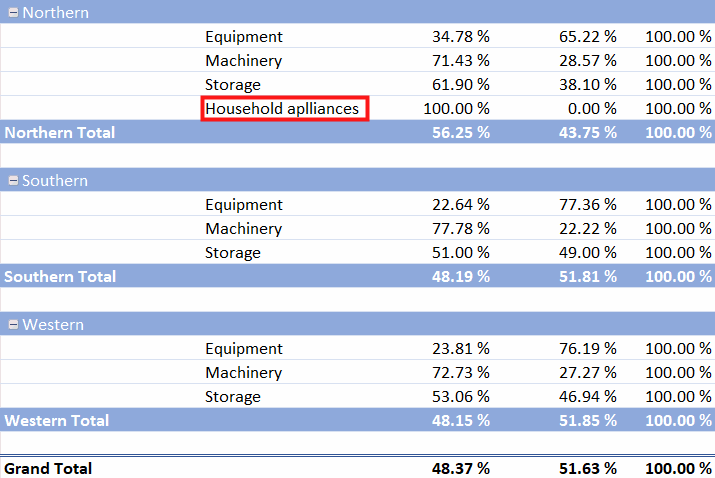
This was a new group and therefore ranked lowest in the Sales by region pPivot table column. Put the column back to alphabetical order (Sort A to Z). In this case, this requires taking into account that the column contains different types of row headers.
Model:
Task: Sort the Comparison by seller table by average sales
When sorting by value field, the interface is slightly different.
Go to the Comparison by seller sheet.
Sort the pivot table by average sales from largest to smallest.
Model:
Next, we will explore a few ways to filter pivot tables. Are you ready to move on to deal with dividers and timelines?