Mixed References
A page in the Basics of Spreadsheets chapter taught relative and absolute references. A mixed reference is a combination of them: It refers to the row relatively and the column directly or the other way around.
A direct reference does not change when copying the formula. The calculation operation and thus also its result is repeated precisely the same in every cell. On the other hand, Mixed References enable the reference to slide in either the row or column direction so that the result of the calculation in each cell can be different A dollar sign $ in front of a column letter or a row number makes the reference direct for the column or row.
| #### Reference type | #### In a formula | |
| #### Relative reference | **A1** | Both the column letter and the row number change relative to the copying direction. |
| #### Absolute reference | **$A$1** | The column letter A and row number 1 stay the same, no matter the copying direction. |
| #### Fixed row | **A$1** | The column letter changes relative to the copying direction. The row number stays 1, despite copying. |
| #### Fixed column | **$A1** | The column number stays A while copying. The row number changes relative to the copying direction. |
The Objective
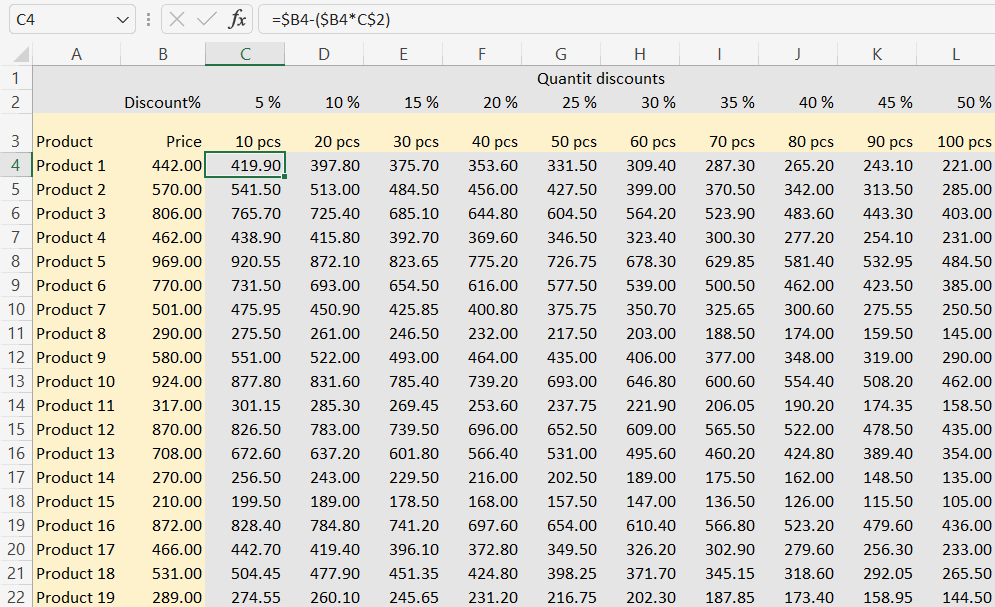
For the spreadsheet Price matrix*, a reduced price has been calculated for each cell. Mixed references have been used so that the formula in cell C4 has been copied to other cells.
Video
Task: Calculate the reduced unit price to the first cell
Do the exercise on the worksheet Price matrix.
Calculate reduced unit prices into cell C4 of the sheet using the formula Price-Discount%*Price. Use mixed references so that the formula is copied correctly later.
Task: Copy the formula to other cells
Copy the formula you created in cell C4 to other cells by dragging. Check that the formula has been copied correctly by examining the formula in cell L26.
How did you like the mixed references and making them? Feel free to ask for help or peer support from the course Message Board if you are concerned at all! If you feel you understand and know how to use mixed references in spreadsheet calculations, you can continue to the next chapter called “Functions”.
Are you ready?