Preview — Office Skills Accelerator course materials (EN). Not production.
Page 9 / 13
Nested functions
Excel functions are powerful in themselves, but their real power comes when we can combine nested functions.
In practice, nested functions have one function as an argument to another.
We practice this in two different exercises.
Video
The objective
Next, we will work on tasks in the Product groups sheet and in the Pay increases sheet.
Product groups
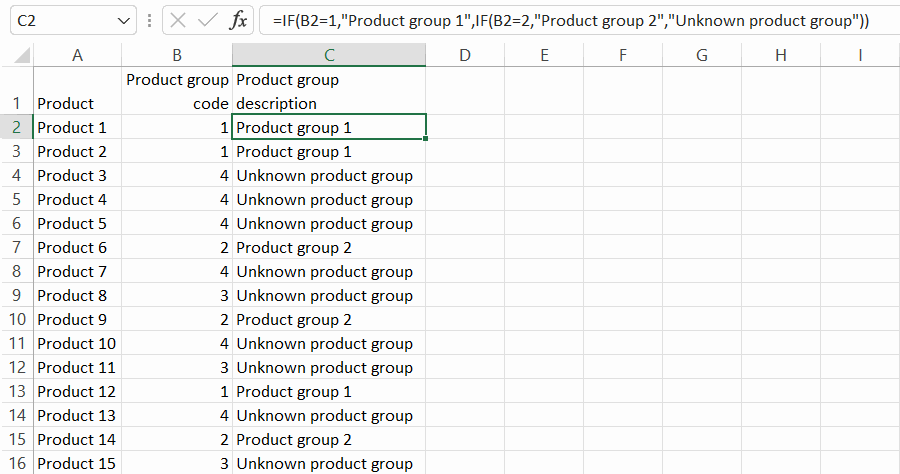
The Product groups sheet contains product groups defined by their code (number). If the code is 1, it is “Product group 1” and if the code is 2, it is “Product group 2”. Otherwise, the product group is unknown.
The product group is identified using two nested IF functions. Example:
Example from the workbook
Pay increases
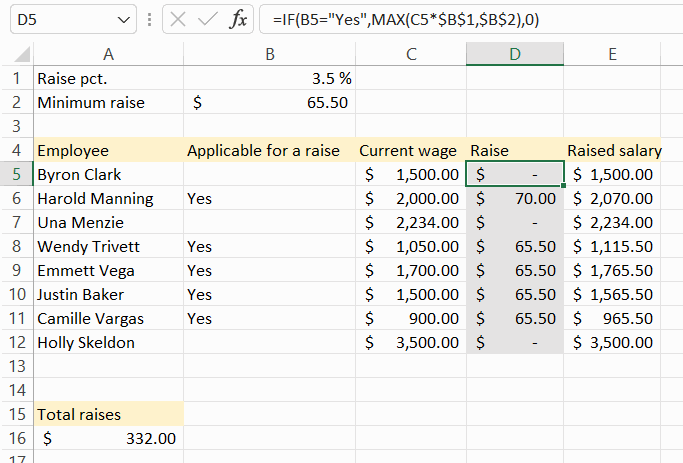
In the Pay increases sheet, we will build a slightly more complex calculation to work out the pay increases for the company's employees. The calculation uses the IF and MAX functions, which are nested.
We calculate a pay rise and a new salary for each employee. The salary will be increased by 3.5%, but not less than $65.50. On the other hand, only certain employees are entitled to a pay rise.
Example from the workbookTask: Make a formula that recognizes product groups
Go to the Product groups sheet in the exercise book.
Set the following conditions for the function:
#### Condition 1
If the product group code is **1**, the product group description is **Product group 1**.
#### Condition 2
If the product group code is **2**, the product group description is **Product group 2**.
#### Otherwise
The product group description is **Unknown product group**.
You can write the formula by hand or use the function library. Most people who use functions a lot find it easier and more straightforward to write it by hand.
Task: Calculate pay rise on the basis of percentage increase
Do the task in the Pay increases spreadsheet.
Let's first build the formula in cell D5, from where we copy it to the following cells.
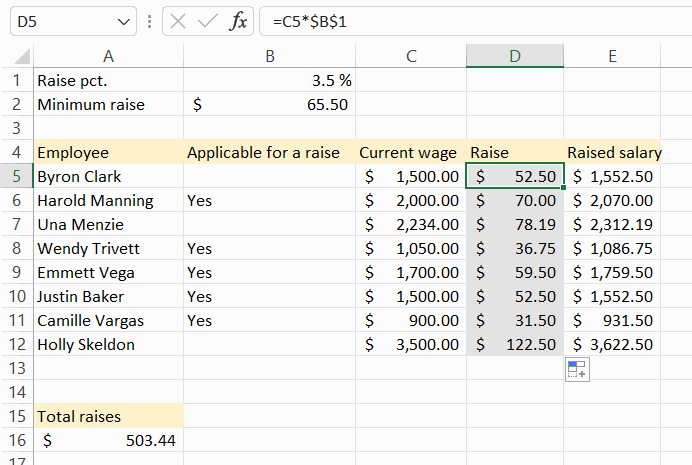
Let's start building the formula with a simple calculation of the salary increase.
Increase=Salary*Percentage increase
Example:
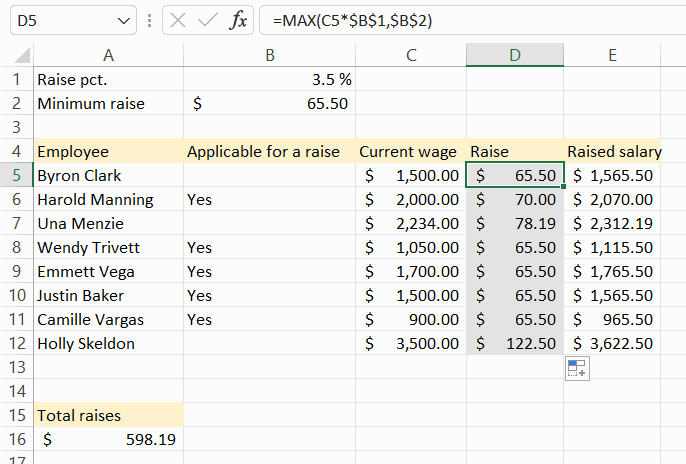
Task: Take the minimum increase into account
Take the minimum increase into account in the calculation of the raise. The pay increase should thus be at least the one indicated in cell B2.