Calculations between Sheets
When using Excel efficiently, we don't just collect information in several completely independent sheets. On the contrary, we want to do calculations between different spreadsheets.
An Excel workbook can have several separate sheets for data and a summary sheet. A typical case is that there is a separate sheet for each month, and you should calculate key figures for the whole year or quarters.
Video
The Objective
Next, we will learn how to perform calculations between several spreadsheets by creating a summary Q1 Total. Each cell has calculated sales from January, February, and March in the spreadsheet.
An example:
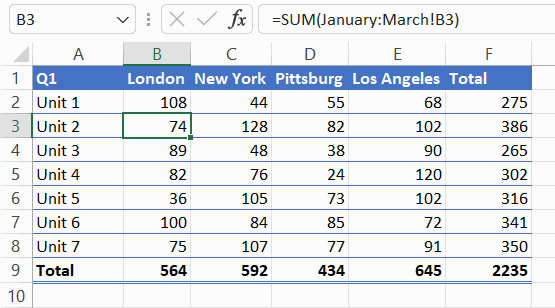
Task: In cell B4, calculate a sum from several sheets
We want to calculate the key sales figures for the 1st quarter, so each month’s sales are in their own sheets. So in practice, we add up the sales in the sheets January, February, and March together intp the sheet Q1 Total.
Sum up the values of the cell B4 in the sheets January, February and March into the cell B4 in the sheet Q1 Total .
Task: Copy the formula to other cells
Finally, copy the formula Q1 Total to all other cells of the spreadsheet (columns B-E, rows 4-10). Note that the formula is not copied to the cells in the Total row or column.
Extra task: Format the total to use the SUM function
The previous task could also have been done in another way. Functions can also be used for calculations between spreadsheets.
Good, you're already off to a great start! Did you remember what you learned earlier, such as adding rows or addition within a spreadsheet? You can move on to the next page if you have successfully completed all the exercises on this page.
Shall we?