The IF Function
The IF function is one of the most used functions in Excel. The function performs a comparison (such as comparing two numbers to each other), and the value it produces depends on the result. At the beginning of this page, there is a more detailed description of the function so that you can find it easily later. You can now skim through it and move on to the actual task, where you will learn the basics of the IF function. Go through the function description after completing the task, and you will understand it better.
The form of the function
=<ek-term id="func_if" />(Logical_test, Value_if_true, Value_if_false)
Logical_test is the condition we want to test.
Value_if_true determines the value the IF function produces if the condition tested is fulfilled, i.e., TRUE.
Value_if_false determines the value the IF function produces if the condition tested is not fulfilled, i.e., is FALSE.
The comparisons used in Logical_test
| #### Operator | #### Meaning | #### Example |
| **=** | Equal to | `A1 = B1` |
| **>** | Greater than | `A1 > B1` |
| **<** | Less than | `A1 < B1` |
| **>=** | Greater than or equal to | `A1 >= B1` |
| **<=** | Less than or equal to | `A1 <= B1` |
| **<>** | Not equal to | `A1 <> B1` |
Example
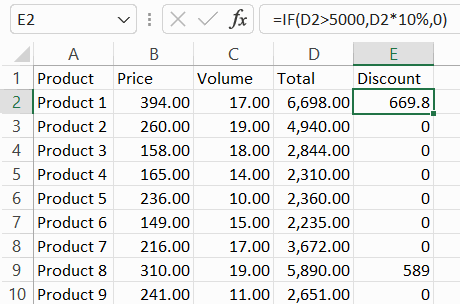
If the total is more than 5000,
then the discount is 10% * total,
otherwise, the discount is 0.
Video
The objective
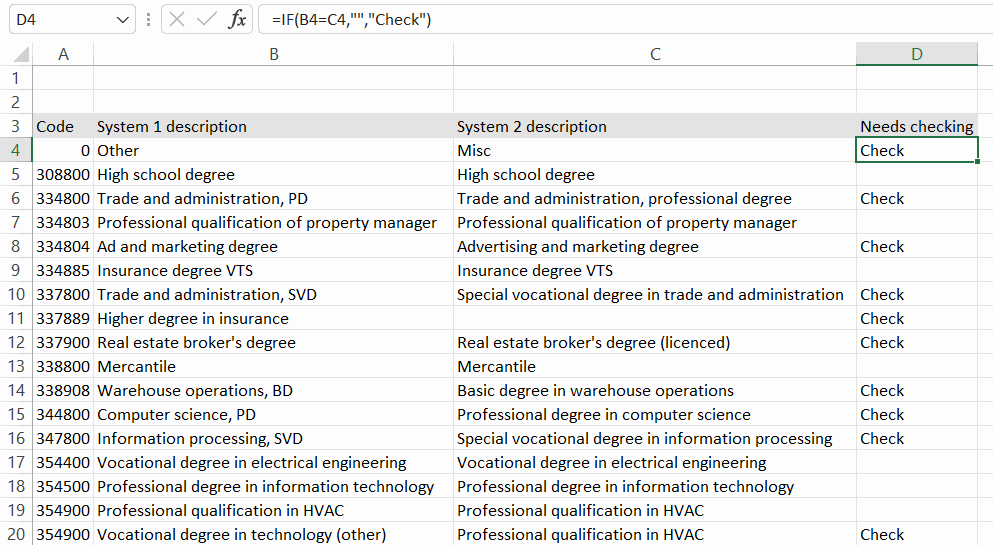
In the first task, we analyze the data imported from two systems. If there is a difference between the values in columns B and C on the Degree titles sheet, the value “Check” is entered in column D. Example:
Info: On quotation marks
We use the double quotation mark (") in formulas, which is highlighted in green in the example image below.
Info: How do I write “less than” (<) or “greater than” (>) symbols?
On different keyboards, the characters < and > can be located in different places. One possible place is on the left side of the Z key. Another possible place is on the right side of the right Alt key. The third option is that these characters are obtained from the comma and period key with the help of the Shift key.
Task: Test equality of contents with the IF function
Do the exercise on the Thesis degrees sheet.
In the “Needs checking” column, enter the information about whether the definitions in System 1 and System 2 are the same. If the definitions differ, the text “Check” should appear in the cells. Otherwise, you want to leave the cell empty.
IF System 1 definition = System 2 definition
THEN Leave the cell empty ("")
ELSE The text “Check” appears in the cell
Let's start by writing the formula in cell D4.
Task: Copy the formula
The IF function is one of the most useful functions in Excel. Using it, you can build various types of logic. The comparison of data practiced in this task is a very typical use.
Next, let's extend the use of the IF function so that we can combine it with other functions.
Are you ready?