Auditing Formulas
Checking a formula manually can be a lot of work, so it's good to know how to use Excel's functionality to streamline it. Next, you'll be able to track down the followers, so to speak, which means practising how to find references to a formula in a large dataset.
Video
The Objective
In the Salary increases spreadsheet, the formulas are displayed. Model:
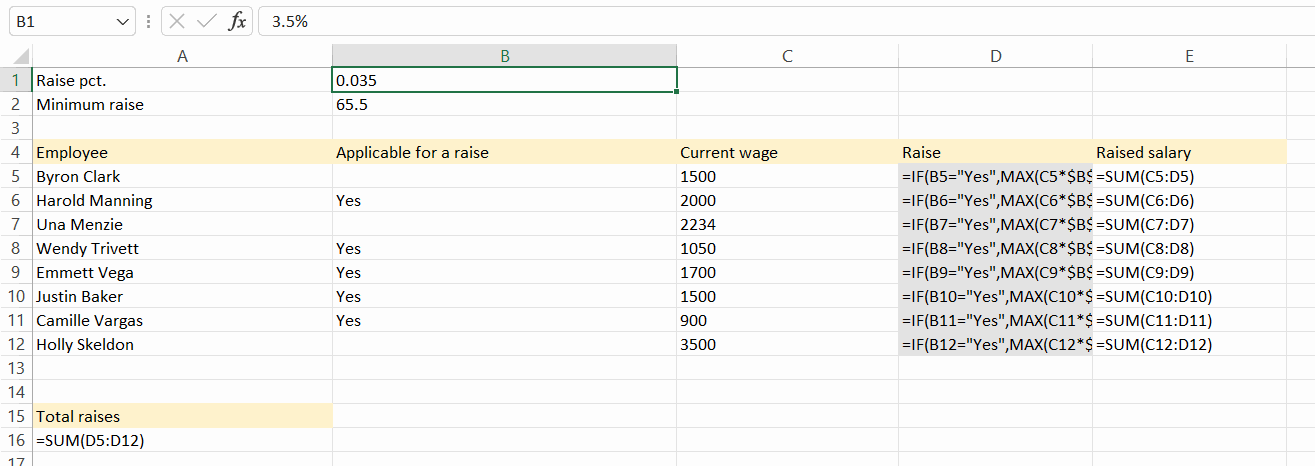
Task: Trace how everything affects the new salary
Go back to the Salary increases spreadsheet.
Explore Trace Precedents the predecessors of cell E5 (Byron Clark’s salary).
Task: Remove the arrows
We have now found out what we want, so we can remove the arrows.
Task: Trace which cells are affected by the percentage increase
Another common situation is when you want to find out what a particular cell affects. You may want to change the cell, and before you do, you want to make sure you don't break anything.
Next, let's examine which cells are affected by the percentage increase (cell B1).
Info: Reference to another spreadsheet
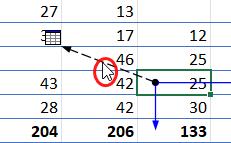 | When the referenced cell is on another spreadsheet, a slightly different arrow appears. Double-click the arrow to open a window showing all the sheets referenced by the cell. |
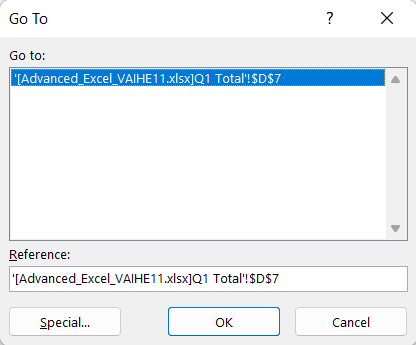 | Select the sheet and click on the **OK** button to go to the cell in the sheet that is used in the formula. |
Task: Show formulas
Sometimes it is useful to see the formulas directly in the table. In the spreadsheet, display formulas instead of values.
Display the formulas on the Pay increases spreadsheet. Model:
You have reached the end of the second chapter on Excel. Good luck! How do you feel now? What did you find easy or perhaps difficult? We would love to hear your feedback on this package.
Return
Return your Excel workbook as an email attachment to [email protected]. Put Excel 2 assignment in the subject line of the email.
Have you returned the assignment?