Extra: Basic Calculations and Absolute Reference
Downloading the base file
Download the workbook Basic_functions_and_absolute_reference.xlsx. All the extra assignments on this page will be done into it.
Basic_functions_and_absolute_reference.xlsxThe Objective
The example assignments are in the workbook you downloaded. For example, the examples for the sheet Sum are in the sheet COMPLETED Sum and so on.
Info: Navigating the workbook
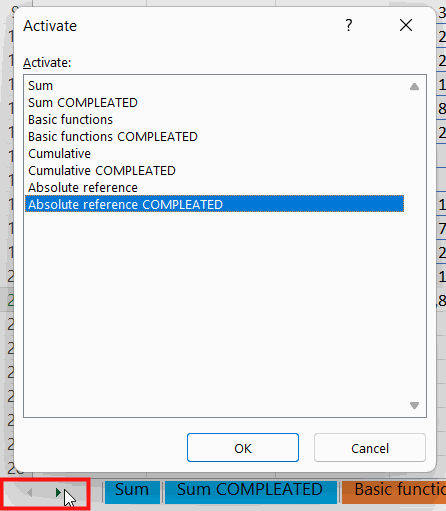 | There are many sheet in the workbook, and a clever way to get to a specific sheet is to **right-click** the mouse in the lower left corner, which opens a list of sheets. |
Task: Sums
Navigate to the Sum sheet.
Let us first exercise using the Sum button in a bit more complicated situation.
Calculate the sums for the 1st quarter, South, North, and the Total row.
Task: Basic Calculations
Navigate to the Basic Calculations sheet.
Make the calculations to the Difference $ and Difference % columns. The formulas appear as comments in the headers.
Then calculate the Total row using the Sum button, but so that you calculate the value going to the “Difference %” column using the values on the row, similarly to the other values in the column.
Task: Cumulative calculation
Navigate to the Cumulative sheet.
Let's practice cumulative calculation. Cumulative calculation refers to a series of numbers where the new value always refers to the previous one.
Calculate “cumulative won bids”, “monthly”, and “cumulative lost bids”.
Finally, check the formula.