Using Multiple Windows Efficiently
When you're working with several programs or files at the same time, there are a few different efficient ways to use multiple windows. This is a particularly useful skill in this online course, where you do the exercises in one window and read the instructions in another. Let's now go through how:
- You can split the screen into two adjacent windows
- You can move from one window to another with a quick key press
Video: Two Windows Side by Side
Task: Two windows side by side
You can arrange the open windows on your screen using either the mouse or the keyboard shortcuts.
Info: The selection ribbon has decreased
When you resize the windows of Office programs or split the screen, the interfaces of the programs adjust to fit the screen size.
This can affect the appearance and usability of the menus and toolbars.

Let's take a look at the Formulas tab in Excel. Above is an image showing how it appears when the window is very wide. For example, in this view, the menus under Function Library tab are each separate buttons.
The appearance of buttons may change or they may be repositioned

In this image, the window is slightly narrower.
Notice how the buttons in the Function Library group change their shape.
The button labels may be removed

When we narrow the window further, some of the Function Library menus lose their text and become small buttons.
An entire group may change into a single button
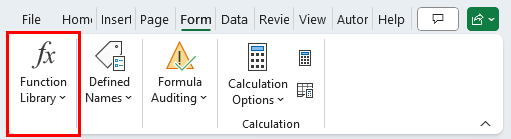
Eventually, when the window is reduced further, the entire group changes into a single button.
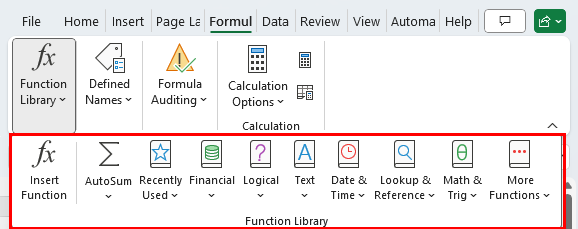
You can open the Function Library group by clicking its button, which will display the group as it appears in the widest window view.
What can be done?
If resizing the window is not enough, you can simplify the Ribbon by removing unnecessary buttons or adjusting display settings to create more space for the Ribbon.
Video: Switching Windows Fast
Task: Browse open windows
When you have several windows open, it is easy to move between them with the Alt+Tab key combination.
Next, we look at the selection ribbon. Especially in situations where you are resizing a window, it is a good idea to know the secrets of the selection ribbon. Shall we mark it as completed and move on?